Blog · Archive
How Virtual CSRs Are Trained on CRM and Processes
Discover how virtual CSRs are trained on your CRM and processes with expert onboarding, QA, and secure workflows for home service businesses.

Why Understanding How Virtual CSRs Are Trained on Your CRM and Processes Can Change How You Run Your Business
How virtual CSRs are trained on your CRM and processes determines whether your remote team becomes a seamless extension of your business — or a source of costly errors and missed opportunities. For HVAC, plumbing, and electrical contractors, the stakes are high: every missed call, misboooked job, or dropped follow-up is revenue walking out the door.
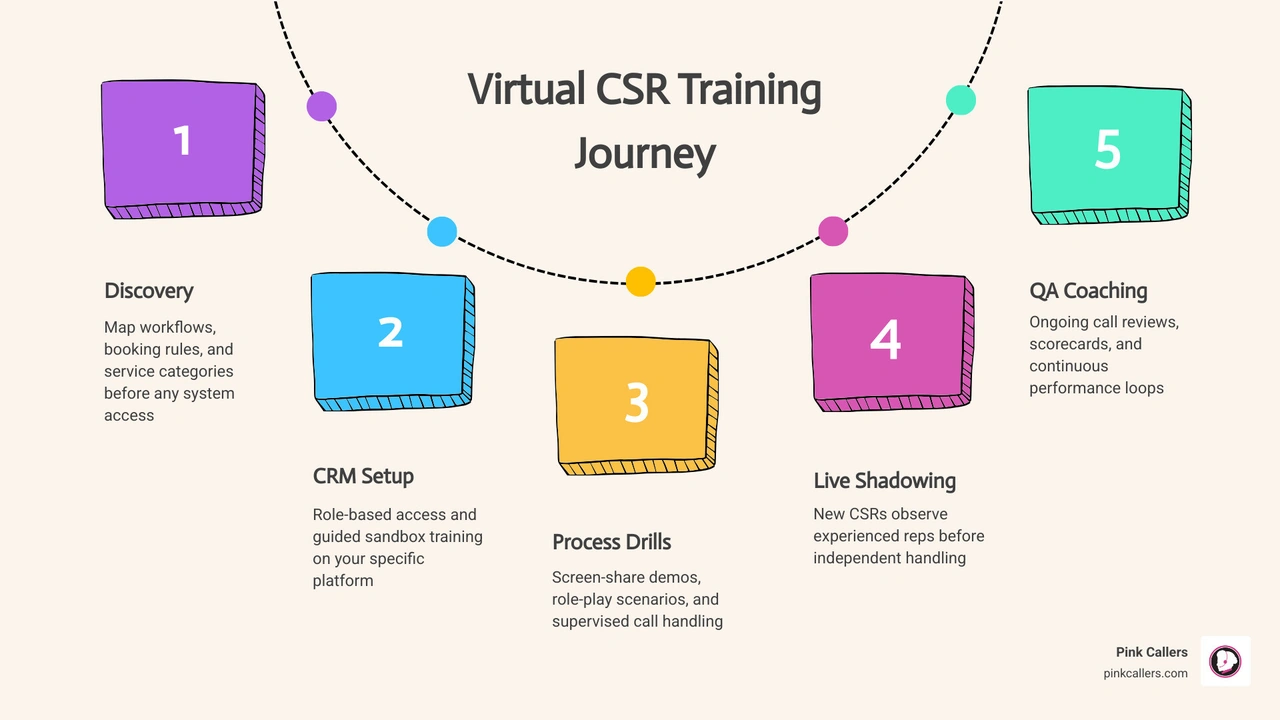
Here is a quick answer to what that training actually involves:
- Discovery - Your workflows, booking rules, and service categories are mapped before any system access is granted
- CRM setup - Virtual CSRs get role-based access to your platform (ServiceTitan, Jobber, Housecall Pro, etc.) with guided sandbox training
- Process drills - Screen-share demos, role-play scenarios, and supervised call handling build real competency
- Live shadowing - New CSRs shadow experienced reps before handling requests independently
- QA and coaching - Ongoing call reviews, scorecards, and coaching loops keep performance consistent after go-live
This matters more than most business owners realize. Research shows that administrative work can consume up to 60% of a service professional's hours — and 88% of customers say service quality is just as important as the product itself. A virtual CSR who is not properly trained on your specific systems and workflows does not just underperform — they can actively erode the customer experience your business depends on.
The sections below walk through exactly how this training works, what the onboarding timeline looks like, and what separates a well-trained virtual CSR from one who is just winging it.
How Virtual CSRs Are Trained on Your CRM and Processes
Training starts long before anyone clicks into your CRM. We first need to understand how your business actually runs in the real world, not just how it looks on a whiteboard.
That means documenting:
- CRM fields, tags, and statuses
- call flows and intake forms
- scheduling rules and dispatch handoffs
- escalation paths
- email and text templates
- note-taking standards
- brand voice and service expectations
For home service businesses, virtual CSRs usually need to learn platforms such as:
- ServiceTitan
- Jobber
- Housecall Pro
- Salesforce
- HubSpot
- Zendesk
- VoIP phone systems
- shared inboxes
- scheduling calendars
- internal chat and collaboration tools
If your operation runs on several systems at once, training covers the full chain. A CSR may answer a call in your VoIP platform, verify account history in the CRM, book service in the scheduling tool, and send a follow-up from a shared inbox. That is why isolated tool training is never enough.
Discovery and workflow mapping come before system access
The first step is a process audit. We map the customer journey from first contact to completed job or closed request.
For contractors, that often includes:
- service categories and priority levels
- emergency vs standard booking rules
- geographic service area rules
- reschedule and cancellation rules
- maintenance membership handling
- estimate follow-up steps
- dispatch handoff rules
- after-hours procedures
- exception handling for unusual situations
This stage matters because remote teams do best when expectations are explicit. In-house teams sometimes rely on hallway conversations or tribal knowledge. Virtual teams need cleaner documentation, which is actually a good thing. It makes the business more scalable.
How virtual CSRs are trained on your CRM and processes step by step
Once workflows are mapped, training usually follows a structured progression:
- Sandbox or test-environment training
- Screen-share walkthroughs of common tasks
- Role-play using real call types and customer scenarios
- Knowledge base review for scripts, FAQs, and SOPs
- Live shadowing of experienced reps
- Supervised handling of tickets, calls, or messages
- Approval checkpoints before independent work
- QA scorecards and coaching after launch
A good training plan starts simple and adds complexity. First, a CSR learns how to locate a customer record. Then they learn how to update notes correctly. Then they practice booking jobs, flagging urgent issues, documenting promises, and routing exceptions.
Nobody should be learning your busiest dispatch workflow for the first time during a Monday morning rush. That is not training. That is chaos with a headset.
The systems virtual CSRs usually learn first
The first systems depend on the business model, but contractor support usually starts with the tools that affect customer response time most directly.
| System | What CSRs usually learn first | Common workflow focus |
|---|---|---|
| ServiceTitan | customer lookup, call booking, tags, notes, job status | scheduling, dispatch coordination, lead capture |
| Jobber | client records, requests, quotes, scheduling basics | service requests, follow-ups, appointment updates |
| Housecall Pro | bookings, customer history, status changes | call intake, rescheduling, technician coordination |
| Salesforce | account records, case updates, tasks | pipeline visibility, service notes, escalations |
| HubSpot | contact records, deal notes, tasks, sequences | lead follow-up, nurture workflows, status tracking |
| Zendesk | tickets, macros, internal notes | email support, queue management, issue resolution |
| VoIP and inbox tools | call handling, dispositions, templates | inbound answering, callbacks, omnichannel support |
If you want more background on how support can flex by volume, this breakdown of How Fractional CSR Services Work for Small Contractors is a helpful next read.
What the onboarding timeline looks like from kickoff to go-live
Most virtual CSR onboarding follows a staged ramp, not a one-day crash course. A practical launch often uses a 30-day structure with earlier go-live for simple workflows and a longer ramp for complex ones.
Research on remote agent onboarding consistently points to progressive stages, and for good reason: remote work is growing fast, with 36.2 million Americans projected to work remotely, or 22% of the workforce. Training needs to be repeatable, measurable, and remote-ready.
Week 1: access, brand immersion, and process documentation
Week 1 is about secure setup and context.
Typical milestones include:
- user account creation
- role-based permissions
- MFA enrollment
- secure password setup
- VPN or approved-access protocols if required
- review of brand guidelines
- service area and hours review
- call disposition definitions
- script and FAQ training
- process documentation review
This is also where we clarify tone. A CSR should know whether your brand voice is highly consultative, concise and urgent, or warm and neighborly. That sounds small, but it affects every call.
Week 2: task drills, channel practice, and supervised workflow execution
Week 2 shifts from knowing to doing.
Training drills often cover:
- answering inbound calls
- handling overflow and after-hours scenarios
- email response standards
- live chat handling
- appointment booking and rescheduling
- note-taking and documentation
- attaching files and indexing records
- creating follow-up tasks
- identifying escalation triggers
This is where role-play becomes especially useful. We simulate the messy stuff: duplicate callers, incomplete addresses, upset customers, no-heat emergencies, and the classic "I called three times already" opener. Glamorous? No. Necessary? Absolutely.
Week 3 and beyond: nesting, QA reviews, and independent handling
By Week 3, many CSRs move into a nesting phase. That means they begin handling real work with oversight still in place.
This phase usually includes:
- shadowing experienced reps
- reverse shadowing, where supervisors observe the trainee live
- calibration sessions on what good documentation looks like
- QA scoring on calls and written responses
- SLA tracking
- first-call resolution review
- coaching loops for recurring errors
As the rep proves consistency, supervision tapers. If your workflow is more advanced, such as multi-step dispatch logic or complex account servicing, training continues well beyond the first month.
For a broader look at contractor-specific remote support, see our Ultimate Virtual CSRs Guide for HVAC Growth.
How remote CSRs are trained to handle requests, documents, follow-ups, and claims accurately
Accuracy training is where process discipline really shows. Fast is good. Fast and wrong is just extra work wearing a fake mustache.
How virtual CSRs are trained on your CRM and processes for request handling
For client requests, CSRs are trained to triage based on urgency, service history, and next-best action.
That usually includes:
- identifying emergency vs routine requests
- confirming customer details before making changes
- reviewing service or account history
- documenting the reason for contact clearly
- updating ticket or job status
- setting callback expectations
- adding dispatch notes when needed
- routing exceptions to the right person
A trained CSR does not just log activity. They create useful context so your technicians, office staff, and managers do not have to decode vague notes later.
Documentation, file naming, and audit-ready recordkeeping
Documentation training is often one of the biggest differences between average and high-performing remote support.
Key standards include:
- attaching files to the correct record
- consistent file naming
- use of required fields
- timestamped notes
- e-signature handling where relevant
- version control awareness
- duplicate prevention
- clear internal vs customer-facing note separation
In insurance-style servicing workflows, these same habits matter even more because a small documentation error can create larger downstream issues. The principle carries over to home services too. If the wrong job note gets attached to the wrong customer, the result can be missed expectations, technician confusion, and unhappy callers.
Our CRM Management Services page goes deeper into how structured data handling supports smoother operations.
Follow-ups, renewals, and claims workflows without dropped tasks
One of the biggest reasons businesses use virtual CSRs is to prevent leads and service tasks from slipping through the cracks. Research shows 79% of marketing leads never convert due to weak nurturing and inconsistent follow-up. That is a painful statistic, especially when the missed lead was sitting in your CRM the whole time.
Training here focuses on closed-loop communication:
- setting task reminders
- tracking pending items
- sending status updates
- following up on estimates
- confirming appointments
- documenting unresolved issues
- escalating stalled items
- closing the loop after completion
In claims-style or service-resolution workflows, the same logic applies: collect the needed information, verify details, document every step, and keep the customer informed until the task is truly complete.
If your business relies on strong post-call processes, you may also like our CRM Management Services Complete Guide.
How quality assurance, security, and ongoing coaching keep performance consistent
Training is not finished at go-live. It shifts into monitoring, coaching, and process refinement.
The metrics that show training is working
Good training produces measurable outcomes. Common KPIs include:
- CSAT
- first-call resolution
- average handle time
- response time
- schedule accuracy
- documentation completeness
- follow-up completion rate
- lead conversion follow-up rate
- adherence to scripts and workflows
These metrics should be reviewed alongside QA observations. A fast handle time is not a win if the notes are useless or the appointment was booked wrong.
Because only 13% of customers solve problems through self-service alone, the quality of human support still matters a lot. And since 88% of customers say service quality matters as much as the product itself, consistent CSR performance is not optional.
Security and compliance practices for CRM access
Remote access has to be secure by design. Standard protections include:
- least-privilege access
- MFA
- secure password policies
- confidentiality agreements
- approved device policies
- audit logs
- privacy and security training
- restricted access to sensitive fields or workflows
When virtual CSRs work inside systems like ServiceTitan, Jobber, or Housecall Pro, permissions should match the role. A booking-focused CSR does not need broad admin rights. Limiting access reduces risk and keeps training simpler.
Ongoing coaching for a brand-aligned customer experience
The best remote teams do not just follow steps. They sound like your business.
That takes ongoing coaching in:
- empathy
- tone control
- de-escalation
- active listening
- product and service knowledge
- writing clarity
- brand-specific phrasing
- objection handling
Call reviews, role-playing, and calibration sessions help keep everyone aligned. This is especially important in a hybrid human-plus-AI environment, where automation can handle repetitive intake while humans manage judgment, nuance, and relationship-building.
For more on that, see Can a Virtual CSR Really Represent My Brand and What is a Hybrid AI and Human Customer Service Model.
How virtual and in-house CSR training differ in practice
Virtual and in-house training aim for the same outcome: reliable, brand-aligned support. The difference is in how training is delivered and documented.
Virtual training usually relies more on:
- written SOPs
- recorded modules
- structured milestones
- screen recordings
- asynchronous review
- permission-controlled system access
- QA scorecards
- remote-ready communication habits
In-house teams sometimes absorb information informally. That can work for small offices, but it is harder to scale and harder to audit.
Where virtual training is often stronger
Remote training is often stronger in areas like:
- process standardization
- documentation quality
- repeatable onboarding
- faster ramp through recorded materials
- broader schedule coverage
- overflow and after-hours readiness
- cross-training across channels
That makes virtual CSR models especially useful for growing teams that need flexibility without sacrificing consistency. If you are weighing support models, our Fractional CSR vs Full-Time Virtual Receptionist Comparison can help.
Where in-house teams may need to borrow remote training habits
Even internal teams benefit from remote-style discipline.
The biggest habits worth borrowing are:
- better written SOPs
- cleaner knowledge bases
- formal buddy systems
- milestone-based onboarding
- regular QA reviews
- tighter permission management
- measurable ramp goals
In other words, remote training often forces the kind of clarity every team should have anyway.
Frequently Asked Questions About How Virtual CSRs Are Trained on Your CRM and Processes
How quickly can a virtual CSR start taking calls in my system?
It depends on workflow complexity. Simple call handling can ramp faster than multi-step scheduling, dispatch coordination, or advanced back-office support. In most cases, a CSR should not go live until they have completed access setup, sandbox practice, role-play, and supervised handling. A readiness checklist is much safer than a calendar guess.
Can a virtual CSR work inside ServiceTitan, Jobber, or Housecall Pro securely?
Yes. With role-based permissions, secure login controls, MFA, and activity logs, virtual CSRs can work inside these platforms securely. The key is giving access only to the workflows they need and pairing that access with clear documentation and QA review.
What skills matter most besides CRM knowledge?
The most important skills are:
- attention to detail
- communication
- empathy
- prioritization
- adaptability
- note-taking discipline
- process adherence
- calm problem-solving
CRM knowledge matters, but tool skill without judgment is not enough. A great CSR combines system accuracy with human clarity.
Conclusion
When businesses ask us about how virtual CSRs are trained on your CRM and processes, the short answer is this: good training is structured, secure, and deeply tied to your real workflow. It starts with discovery, moves through guided system practice, and continues with QA, coaching, and measurable performance standards.
At Pink Callers, we build that process around the realities of home service operations, including hybrid AI plus human support, ServiceTitan expertise, 24/7 coverage, and scalable workflow adoption. If you want a team that can work inside your systems without sounding like outsiders, the training model matters just as much as the staffing model.
To learn more, explore our Virtual CSR Services.
Keep reading
More from the blog
How We Handle Multi-Trade Dispatching for HVAC and Plumbing Combos
Misrouting an ambiguous 'no hot water' call wastes highly skilled technicians' time. We break down the exact intake triage rules that successfully separate plumbing from HVAC tickets.
Read → September 14, 2026Outsourced Customer Service vs Hiring a Local Temp Agency
Losing a dispatcher right before the fall heating rush can overwhelm any contractor. Compare the operational impact of a specialized call center versus a local temp worker to protect your revenue.
Read → September 11, 2026Transitioning Phone Scripts for Northeast Fall Boiler Prep
The first freeze brings a sudden wave of urgent no-heat calls that can easily overwhelm untrained CSRs. Prepare your dispatch board by strategically updating your front-office triage process.
Read →