
Blog · Archive
How CRM Management Improves Lead Conversion Rates
Discover how CRM management improves lead conversion rates for contractors with faster follow-up, smarter nurturing, and seamless integrations that turn more prospects into paying customers.

Why CRM Management Is the Missing Link in Your Lead Conversion Strategy
How CRM management improves lead conversion rates comes down to one simple idea: most home service businesses are already generating enough leads — they're just losing them after the first touchpoint. A missed call, a slow follow-up, a lead stuck in a spreadsheet — these are the silent revenue killers that add up fast.
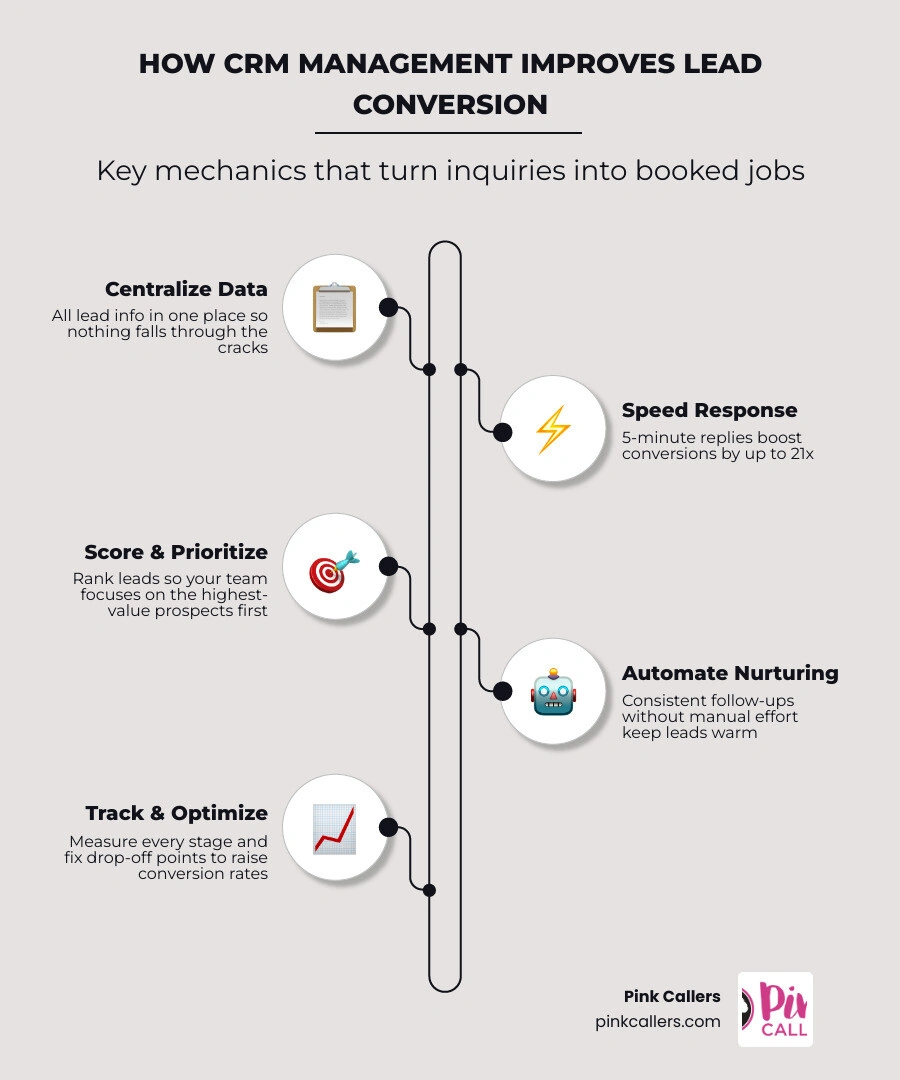
Here's a quick summary of how CRM management improves lead conversion rates:
- Centralizes all lead data so nothing falls through the cracks
- Automates follow-ups to keep leads warm without manual effort
- Speeds up response time — leads contacted within 5 minutes are 21x more likely to convert
- Scores and prioritizes leads so your team focuses on the best opportunities first
- Integrates with your lead sources (web forms, ads, chat) to capture every inquiry automatically
- Tracks performance metrics so you can see exactly where leads drop off and fix it
The numbers back this up. CRM implementation can boost lead conversion rates by up to 23%, and businesses that respond to leads within one minute report up to 391% more conversions. For HVAC, plumbing, and electrical contractors — where a single missed call can mean a lost job — that gap is enormous.
Yet the average business takes 47 hours to respond to a new lead. That's not a lead generation problem. That's a lead management problem.
This guide breaks down exactly how to fix it.
How CRM Management Improves Lead Conversion Rates: The Core Mechanics
At its heart, systematic lead management is about taking control of the entire customer journey from the moment an inquiry lands to the second the technician finishes the job. When home service contractors in fast-growing markets like San Diego, Fort Worth, Nashville, or Charlotte struggle to grow, they often assume they need to spend more on Google Local Services Ads or SEO. In reality, their leaky sales pipeline is draining their hard-earned marketing dollars.
By transitioning from loose contact tracking to structured lead management, you create a repeatable, predictable system. Proper CRM management ensures that every inbound lead is captured, enriched with accurate data, qualified, routed to the right team member, and nurtured until they book. It shortens your sales cycle and maximizes the value of every single marketing dollar.
To understand why this transition matters, we must look at the difference between simple contact storage and active lead management.
| Feature / Capability | Basic Contact Management | Advanced CRM Lead Management |
|---|---|---|
| Data Storage | Flat contact lists (name, phone, email) | Dynamic timelines with comprehensive customer history |
| Automation | Manual entry and manual follow-ups | Automated routing, instant notifications, and drip campaigns |
| Speed-to-Lead | Dependent on when a staff member checks emails | Immediate automated responses and instant CSR dispatching |
| Pipeline Visibility | Cluttered inbox or static spreadsheet rows | Visual drag-and-drop pipelines showing exact deal stages |
| Lead Prioritization | "First come, first served" | Automated lead scoring based on intent and job value |
| System Integration | Disconnected from marketing platforms | Direct API integrations with web forms, LSAs, and chat |
The Difference Between Contact Management and CRM Lead Management
Many contractors believe they are managing their leads simply because they use a digital address book or have a system where they type in customer names. However, basic contact management is passive. It stores static information like phone numbers and physical addresses but does nothing to guide the prospect toward booking.
Advanced CRM lead management is active. It tracks the complete customer history, mapping every phone call, email, text, and past service visit on a single, unified timeline. When you implement a comprehensive strategy, as outlined in our CRM Management Services Complete Guide, you turn your database into an active sales tool.
This deep relationship tracking ensures that when a CSR picks up the phone, they aren't asking repetitive questions. They already know that the caller from Jacksonville had their AC serviced last summer and is now inquiring about a system replacement. This level of context is how you Get the Most From Your CRM and build immediate trust with your prospects.
How CRM Management Improves Lead Conversion Rates Through Speed-to-Lead
If there is a holy grail of lead conversion, it is "speed-to-lead." In the home service industry, the first company to respond to an inquiry almost always wins the job. Customers facing a clogged drain or a broken heat pump in the middle of a hot summer in Fort Worth aren't going to wait around. They will call the next name on Google.
Consider these staggering statistics:
- Leads contacted within a 5-minute window are 21 times more likely to convert and 100 times more likely to qualify compared to those contacted after 30 minutes.
- Responding to a lead within 1 minute can boost conversion rates by 391%.
- Delaying your follow-up by just 5 minutes causes your conversion rates to drop eightfold.
Yet, despite this reality, only a tiny fraction of businesses achieve these response times. This is where advanced CRM management becomes your ultimate competitive advantage. By configuring your CRM to trigger instant alerts, automate initial text responses, and immediately route hot leads to a live virtual receptionist, you ensure your business is always the first responder. For a deep dive into mastering this process, refer to our Contractor Lead Follow Up Guide to eliminate delays entirely.
The 7 Stages of an Effective CRM Lead Management Process
To consistently turn cold inquiries into booked jobs, your business must establish a structured, seven-stage lead management pipeline. If your team fails at even one of these stages, the entire conversion funnel leaks revenue.

- Lead Capture: Automatically pulling inquiries from all channels—phone calls, website forms, local service ads, and chat—into your CRM without manual data entry.
- Lead Enrichment: Automatically appending critical data points to the contact record (such as verified address, property history, and lead source) so your team has full context.
- Lead Qualification: Determining whether the lead is a true prospective customer who fits your service area and service offerings.
- Lead Scoring: Assigning numerical values to leads based on their likelihood to convert and the potential value of the job.
- Lead Distribution: Instantly routing the qualified lead to the correct technician, CSR, or department based on skill, location, and availability.
- Lead Nurturing: Keeping warm prospects engaged through automated, targeted multi-channel follow-ups if they aren't ready to book immediately.
- Lead Conversion & Analysis: Successfully booking the job, dispatching the technician, and analyzing the data to see which marketing channels yielded the highest ROI.
Prioritizing Prospects with Lead Scoring and Segmentation
Not all leads are created equal. A lead requesting an emergency commercial electrical panel upgrade in Charlotte is far more valuable and time-sensitive than a lead asking for a basic residential estimate scheduled three weeks out. Without a way to prioritize these inquiries, your office staff can easily get bogged down handling low-value tasks while high-value opportunities sit unanswered.
By implementing lead scoring and segmentation, you can automatically categorize leads by buyer intent, geographic location, and estimated job size. When you are Mastering Your CRM for Home Service Pros, you configure rules that flag high-priority leads the second they enter your system. If a lead scores above a certain threshold, your CRM can automatically push them to the top of your call list or trigger an immediate phone call from your virtual CSR team.
How CRM Management Improves Lead Conversion Rates via Automated Nurturing
What happens to the leads that don't book on the first call? In most home service companies, they are simply forgotten. Sales teams get busy answering new incoming calls, and older, unbooked leads slip away into the dark corners of a spreadsheet.
CRM automation cures this problem by handling follow-up consistency on autopilot. By building automated nurturing workflows, your CRM can send personalized drip campaigns via email and SMS to keep your brand top-of-mind.
Whether it is a friendly reminder to schedule an annual HVAC tune-up before the summer heat hits Nashville, or a follow-up offering a seasonal discount on electrical safety inspections, these touchpoints run without requiring a single second of your office staff's time. This consistent, automated outreach dramatically boosts overall sales productivity and ensures you are Optimizing Outgoing Communication with CRM systems to capture every possible booking.
Integrating CRM with Lead Generation Platforms to Prevent Revenue Leakage
Generating leads across multiple platforms is great, but if those platforms don't talk to your CRM, you are begging for human error. If your office staff has to manually copy and paste details from Google Local Services Ads, Angi Leads, Facebook ads, and website contact forms into your scheduling software, leads will inevitably get lost.
Direct platform integration solves this. When your lead generation channels are connected via API directly to your CRM, every single inquiry is populated in real-time.
With professional CRM Management Services, your systems are fully synchronized. If a homeowner in San Diego submits a web form at 9:00 PM, the lead is instantly created in your CRM, the data is verified, and an automated text is sent to the customer confirming their request—all while your physical office is closed.
Enhancing Team Collaboration and Data Accuracy
A disorganized CRM is almost as bad as having no CRM at all. When multiple call takers, dispatchers, and field technicians are all entering data differently, your customer records quickly become a chaotic mess of duplicates and incomplete entries.
Maintaining strict data hygiene is essential for keeping your operations running smoothly. Our guide on How to Keep Your CRM Clean and Organized outlines how setting up mandatory fields, drop-down menus, and automated duplicate checks keeps your data pristine.
When your team has access to clean, accurate, and real-time customer data, team collaboration skyrockets. A dispatcher in Jacksonville can look at a record and instantly see what a technician in the field did earlier that morning, providing a seamless customer experience that builds long-term loyalty.
Overcoming Common CRM Implementation Pitfalls
While the benefits of CRM lead management are clear, implementing these systems is not without its challenges. Many home service businesses invest thousands of dollars in powerful platforms like ServiceTitan, Jobber, or Housecall Pro, only to find their teams still relying on paper calendars and post-it notes.
The most common implementation challenges include:
- Low User Adoption: Staff members resisting the new software because it feels too complex or disrupts their established routines.
- Overly Complex Setup: Configuring too many pipeline stages or mandatory fields, which slows down your team instead of speeding them up.
- Data Decay: Allowing old, unverified, or duplicate data to accumulate, which ruins your reporting accuracy.
To overcome these hurdles, business owners must focus on structured change management. This means providing comprehensive training, assigning a dedicated CRM champion in the office, and starting with a simple, clean setup before adding advanced automations. Working with a professional, as detailed in our CRM Management Specialist Complete Guide, ensures your system is built correctly from day one and customized to your specific operational workflows.
Leveraging AI and Predictive Features in Modern CRMs
As we move through 2026, the capabilities of modern CRMs have expanded far beyond simple data storage. The integration of generative AI and predictive analytics is completely transforming how contractors manage their sales funnels.
With AI-powered systems, businesses can now deploy autonomous agents that handle 24/7 lead qualification through natural, conversational text messages. Predictive analytics tools can analyze your historical job data to forecast sales trends, predict which neighborhoods in Charlotte are most likely to need system upgrades, and identify which customers are at risk of churning.
By leveraging these cutting-edge tools through tailored CRM Management for Contractors, you can automate up to 50% of your administrative tasks, allowing your team to focus on what they do best: delivering exceptional service in the field.
Frequently Asked Questions about CRM Lead Management
What metrics should be tracked to measure CRM lead management ROI?
To accurately measure the financial return of your CRM investment, you should track four primary key performance indicators (KPIs):
- Lead-to-Customer Conversion Rate: The percentage of total inbound leads that successfully turn into paid, booked jobs.
- Sales Cycle Length: The average number of days or hours it takes from the initial customer contact to the completion of the job.
- Customer Acquisition Cost (CAC): The total marketing and operational spend required to acquire a single new paying customer.
- CRM Revenue Uplift: The direct increase in average job value and repeat bookings driven by automated follow-ups and personalized service history tracking.
How fast should a contractor respond to a new inbound lead?
Ideally, a contractor should respond within the 5-minute window. Leads contacted within this timeframe are 21 times more likely to convert. If you can leverage automation or a virtual receptionist service to respond within 1 minute, you can see up to a 391% increase in conversion rates. In a competitive local market, speed-to-lead is the single most important factor in winning the job.
How does CRM integration shorten the B2B sales cycle?
CRM integration shortens your sales cycle by automating repetitive administrative tasks, eliminating manual data entry, and streamlining team communication. Instead of waiting for a field technician to return to the office to hand over a paper estimate, the digital estimate is generated, tracked, and followed up on automatically through the CRM. This drastic increase in deal velocity keeps jobs moving forward without unnecessary delays, as detailed in our comprehensive Contractor Lead Conversion Guide.
Conclusion
Understanding how CRM management improves lead conversion rates is the key to unlocking sustainable, predictable growth for your home service business. By centralizing your customer data, optimizing your speed-to-lead, and automating your nurturing workflows, you ensure that no opportunity is ever wasted.
At Pink Callers, we specialize in helping HVAC, plumbing, and electrical contractors bridge the gap between lead generation and lead conversion. Through our unique Human + AI Hybrid model, we combine our intelligent voice AI assistant ("pAIge") with highly trained, ServiceTitan-certified virtual CSRs. We provide 24/7/365 coverage, ensuring that every call, text, and chat is answered instantly, qualified, and booked directly into your CRM.
Ready to stop losing leads and start scaling your business? Learn how we can help you turn more prospects into profits by visiting our Pink Callers Contractor Lead Follow Up page today.
Keep reading