Blog · Archive
A Practical Guide to Choosing the Right Phone Support for Your Business
Discover how choosing the right phone support for your business improves call handling, scalability, and customer experience with the best systems and features.

Understanding Business Phone Systems and Number Types
Choosing the right phone support for your business is one of the most consequential decisions you'll make as a home service contractor — and most owners don't realize it until they've already lost leads.
Here's a quick overview to match what most business owners are looking for:
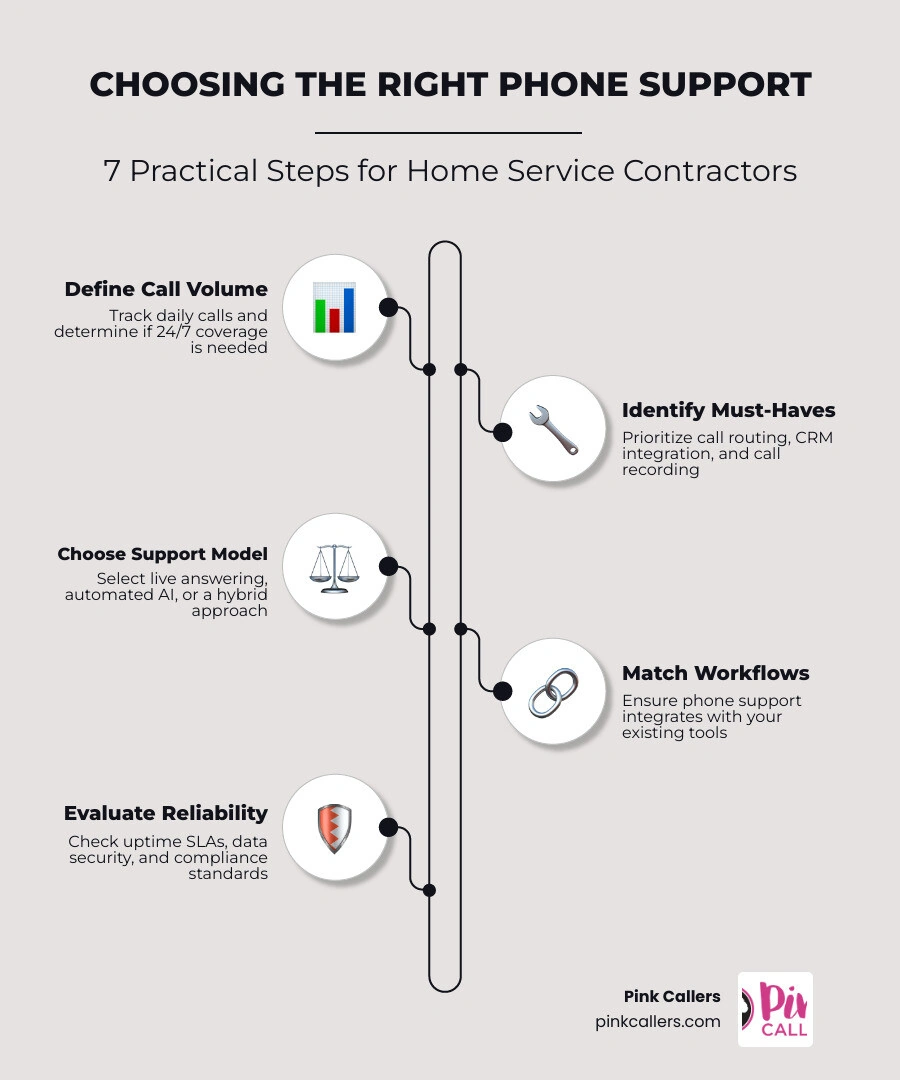
How to choose the right phone support for your business:
- Define your call volume and coverage needs — How many calls come in daily? Do you need 24/7 coverage?
- Identify your must-have features — Call routing, CRM integration (like ServiceTitan), scheduling, and call recording are common priorities for HVAC, plumbing, and electrical businesses.
- Choose your support model — Live answering, automated/AI, or a hybrid of both.
- Match the system to your workflows — Your phone support should work with your existing tools, not against them.
- Evaluate reliability and compliance — Look for uptime guarantees, data security, and any industry-specific requirements.
- Understand the full cost — Advertised per-user pricing rarely reflects what you'll actually pay once add-ons are included.
- Test before you commit — Run a pilot or trial period before signing a long-term contract.
Consider this: 72% of people who contact customer support do so over the phone. And according to research from BrightLocal, 85% of consumers who call a business and can't get through simply won't call back. For an HVAC company in the middle of a summer heat wave, or a plumber handling emergency calls on a Sunday night, a missed call isn't just an inconvenience — it's a lost job.
The challenge is that the market for business phone support has never been more crowded or confusing. You've got traditional landlines, VoIP systems, virtual receptionists, AI answering tools, and full-service outsourced call centers — all competing for your attention with headline pricing that rarely tells the full story.
This guide cuts through the noise. Whether you're setting up phone support for the first time or rethinking a system that's letting calls slip through the cracks, you'll find a clear, practical framework here for making the right call — without getting burned by a flashy feature list or a contract you can't get out of.
Choosing the right phone support for your business word guide:
- do virtual receptionists actually book jobs or just take messages
- how does a virtual receptionist differ from an answering service
At its core, a business phone system is a communications platform designed to route, manage, record, transfer, and control voice communications across an entire company.
Unlike a personal or consumer phone line, which simply connects one device to one phone number, a business system gives you complete operational control. It allows you to decide who answers, how calls are routed during and after business hours, and how customer data is processed.
If you run a contracting business in San Diego, Fort Worth, or Charlotte, relying on a personal cell phone or a basic consumer line is a recipe for chaos. Consumer lines lack the ability to build a cohesive, professional brand image. They cannot handle simultaneous inbound calls, meaning your customers will hear a busy signal or get sent straight to a generic voicemail.
When you transition to a dedicated business system, you gain the administrative oversight needed to ensure no lead is ignored. This transition is a key step in Choosing a Phone Answering Service that can scale alongside your growth.
Key Benefits of a Dedicated Business System
Upgrading to a professional, dedicated phone system provides several essential advantages:
- Security and Reliability: Business-class systems offer built-in encryption, secure data handling, and robust backup protocols. If your local office experiences a power outage, your calls are automatically rerouted to mobile devices or backup agents, keeping your business online.
- Deep CRM Integration: Modern systems connect directly with your customer relationship management (management platforms) like ServiceTitan, Jobber, or Housecall Pro. When a customer calls, their service history, address, and past invoices instantly appear on your dispatcher's screen.
- Operational Control and Call Management: You can set complex call-routing rules, design custom interactive voice response (IVR) menus, and monitor live call queues to keep wait times to an absolute minimum.
- Brand Authority: A dedicated business system makes a small team of three to five people feel like a highly organized, professional enterprise.
For contractors seeking to maintain responsiveness and competitiveness, selecting the Best Phone Answering Service for Small Business is a critical component of this infrastructure.
Evaluating Business Phone Number Types
Not all phone numbers are created equal. Depending on your business model and where your target clients are located, you will need to evaluate several different number types:
- Local Numbers: These numbers use specific local area codes (such as +1 619 for San Diego, +1 817 for Fort Worth, or +1 704 for Charlotte). Using a local number establishes a strong community presence. Homeowners are significantly more likely to answer calls and trust contractors who appear to be located right down the street.
- Toll-Free Numbers: Utilizing prefixes like 800, 888, or 877, toll-free numbers allow callers to reach you without incurring long-distance charges. These are excellent for national marketing campaigns or centralized dispatch centers, though they lack the personal, neighborhood feel of a local number.
- Virtual Numbers: These numbers are not tied to a physical landline or a specific SIM card. They exist in the cloud, allowing you to route calls to any device, anywhere. This is perfect for remote service coordinators or field technicians who need to place calls using the main business line from their personal mobile devices.
- International Numbers: If your business expands to serve clients across national borders, international numbers allow foreign customers to reach your team without facing steep international calling rates.
- Shortcode Numbers: These are abbreviated, five- or six-digit numbers primarily used for high-volume marketing campaigns and rapid SMS communications.
For home service providers, a combination of local virtual numbers usually delivers the best results. It ensures a strong local identity while giving your team the flexibility to answer calls from the office, the field, or home.

Comparing PBX, VoIP, and UCaaS Architectures
To make an informed decision when choosing the right phone support for your business, you must understand the underlying technology architectures. The industry has shifted away from traditional analog landlines toward highly flexible, cloud-based setups.
- PBX (Private Branch Exchange): This is a private telephone network used within a company. Traditional PBX systems were on-premises, requiring massive physical hardware, dedicated server closets, and expensive maintenance contracts. While highly stable, they are incredibly rigid and costly to scale.
- VoIP (Voice over Internet Protocol): VoIP routes voice calls over your existing internet connection instead of copper telephone wires. It is highly cost-effective, saving businesses up to 60% compared to traditional analog landlines. Setting up a VoIP system is simple, and it allows you to easily add new lines as your team grows.
- UCaaS (Unified Communications as a Service): UCaaS takes VoIP technology and expands it into an all-in-one communications suite. Instead of just handling voice calls, UCaaS integrates video conferencing, team chat, SMS texting, and file sharing into a single cloud-hosted platform. It is highly popular for modern, distributed teams.
| Feature | On-Premises PBX | Cloud-Hosted VoIP | Cloud-Hosted UCaaS |
|---|---|---|---|
| Upfront Cost | High (hardware & installation) | Low (plug-and-play) | Low (subscription-based) |
| Scalability | Difficult (requires physical cards) | Extremely Easy (click to add lines) | Extremely Easy (instant provisioning) |
| Maintenance | Internal IT or expensive vendor | Managed by the provider | Managed by the provider |
| Remote Support | Limited or complex VPN setup | Native mobile and desktop apps | Native mobile, desktop, and web apps |
| Integrations | Rare or custom-coded | Standard CRM & email integrations | Deep API integrations (CRM, SMS, Chat) |
| Uptime & Recovery | Dependent on local power/internet | Built-in geographic redundancy | Built-in geographic redundancy |
Choosing the Right Phone Support for Your Business Infrastructure
When deciding between cloud-hosted, on-premises, or hybrid deployment models, small to mid-sized home service businesses should almost always lean toward cloud-hosted solutions.
Cloud-hosted systems eliminate the need for local IT overhead. If you are operating out of Middleburg, Virginia, or dispatching crews in Jacksonville, Florida, a cloud-hosted platform allows you to manage your entire call flow from a simple web browser.
However, cloud-hosted systems still require a solid local foundation. You must ensure your local network is ready for VoIP. Each active VoIP call requires approximately 100 Kbps of symmetrical upload and download bandwidth. Before making the switch, run a network readiness test to check for latency, jitter, and packet loss. If your local office internet connection is unstable, even the best cloud system will suffer from dropped calls and choppy audio.
Key Features to Prioritize When Choosing the Right Phone Support for Your Business
When evaluating providers, do not get distracted by a massive list of features you will never use. Instead, focus on the core capabilities that directly impact your daily operations, customer experience, and lead conversion rates.
Advanced Call Routing and CRM Integration
For an HVAC, plumbing, or electrical contractor, call routing is the backbone of your customer service. You need a system that can route calls based on skill, department, or geographic location. If a customer calls with an emergency water leak, the system should instantly route them to an emergency dispatcher rather than a general voicemail box.
This is where deep CRM integration becomes invaluable. Platforms like ServiceTitan are the lifeblood of modern contracting businesses. Your phone support system should integrate seamlessly with your CRM.
When a call comes in, the integration should automatically log the call, display the client's existing profile, and allow your representative to book the appointment directly into the dispatch schedule without switching tabs.
To understand how these roles differ and how they can streamline your booking processes, it is helpful to look at How Does a Virtual Receptionist Differ from an Answering Service.
Security, Compliance, and Disaster Recovery
Depending on your industry, you may need to comply with specific regulatory standards:
- HIPAA: If you coordinate services for medical facilities or senior living centers, your communication channels must protect patient privacy.
- PCI-DSS: If you accept credit card payments over the phone, your call recording system must automatically mute or mask sensitive payment details.
- GDPR/CCPA: You must ensure customer data, call recordings, and contact logs are stored securely and can be deleted upon request.
Furthermore, look for providers that offer a written Service Level Agreement (SLA) with a 99.99% or 99.999% uptime guarantee. A system with 99.0% uptime sounds good on paper, but it actually translates to over three days of potential downtime per year.
In our industry, even an hour of downtime during a peak weather event can cost thousands of dollars in lost opportunities. Ensure your provider has a clear, automated disaster recovery protocol to route calls to mobile networks if a primary server goes offline.
Navigating the Selection Process and Avoiding Common Pitfalls
Many business owners make the mistake of shopping for phone support based on the lowest headline price. This often leads to a "race-to-the-bottom" experience characterized by dropped calls, hidden fees, and non-existent customer support.
To avoid these costly traps, follow this structured evaluation process:
- Map Your Workflows First: Before talking to any sales representative, document your exact call flow. What happens when a customer calls at 2:00 PM on a Tuesday? What happens at 2:00 AM on a Sunday?
- Request a Real Bill: Ask prospective providers to show you a redacted bill from an active client of a similar size. This will reveal the true, all-in cost, including regulatory recovery fees, E911 charges, and administrative taxes.
- Test the Support Model: Call the provider's support line at 4:30 PM on a Friday. Do you get connected to a live, helpful human, or are you stuck navigating a frustrating automated chatbot? The quality of human support after installation is the single most predictive factor in long-term satisfaction.
- Run a Structured Pilot: Never sign an annual contract without testing the system first. Run a 14-to-30-day pilot program with a small portion of your team to verify call quality, mobile app reliability, and CRM integration depth.
Choosing the Right Phone Support for Your Business Workflows
As you design your communication strategy, you must decide who will actually answer the phone. Many contractors find themselves caught between automated systems and live answering services.
While automated auto-attendants are useful for basic routing, they can frustrate customers who are dealing with urgent home emergencies. On the other hand, traditional answering services often do little more than take a message, leaving you to do all the follow-up work later.
We recommend reading our detailed guide on How to Choose Between Automated and Live Answering Services to find the perfect balance for your specific operational needs.
Frequently Asked Questions about Business Phone Support
Can I keep my existing phone numbers when switching?
Yes. Under Federal Communications Commission (FCC) regulations, you have a legal right to keep your existing phone numbers when switching providers. This process is known as "number porting."
It typically takes anywhere from 2 to 10 business days for local numbers, and up to 4 weeks for complex toll-free setups. To ensure a seamless transition without losing a single call, keep your service active with your old provider until the porting process is completely finalized.
What is the difference between a virtual receptionist and an answering service?
While the terms are often used interchangeably, there is a massive difference in the level of service and customer experience they provide:
- Traditional Answering Service: Typically operates as a basic message-taking service. These agents answer the phone, write down a name and phone number, and email or text the message to your team. They do not integrate with your CRM, book appointments, or qualify leads.
- Virtual Receptionist: Acts as a seamless, integrated extension of your internal office team. A virtual receptionist can answer complex questions, qualify leads, schedule jobs directly into your CRM (like ServiceTitan), and dispatch technicians in real time.
For a deeper dive into these differences, check out our article on the Virtual Receptionist vs Answering Service Difference.
How do I ensure high call quality for remote teams?
To maintain crystal-clear audio quality for remote dispatchers or virtual CSRs, prioritize the following network configurations:
- Quality of Service (QoS): Configure your office router to prioritize voice traffic (VoIP) over general web browsing or video streaming.
- Wired Connections: Encourage remote team members to use wired Ethernet connections rather than relying on Wi-Fi, which is prone to interference and signal drops.
- Professional Headsets: Equip your team with high-quality, noise-canceling USB headsets to eliminate background distractions.
Conclusion
Choosing the right phone support for your business is not just an IT decision — it is a revenue decision. In the competitive home services sector, the way you handle your phones directly dictates your booking rates, your customer retention, and your ultimate growth.
At Pink Callers, we help HVAC, plumbing, and electrical contractors bridge the gap between advanced technology and authentic human connection. Our unique Human + AI Hybrid model combines our intelligent voice assistant, "pAIge," with experienced, ServiceTitan-certified virtual CSRs.
We provide 24/7/365 coverage, ensuring that your business never misses a lead, whether it comes in at noon or midnight. Operating out of Middleburg, Virginia, and serving contractors nationwide, we deliver the scalability, responsiveness, and industry-specific expertise you need to keep your calendar full and your technicians moving.
Ready to transform your phone support into a high-converting revenue engine? Let's build a smarter communication strategy together.
Learn more about Virtual CSR Services and discover how Pink Callers can support your business growth today. You can also view our Pricing or sign up for a Free Trial to experience the difference firsthand.
Keep reading