Blog · Archive
How to Pick a CRM Integration That Won't Make Your Virtual Team Quit
Master choosing the right crm integration for your virtual team. Avoid burnout, boost productivity, and centralize data for remote success in 2026.

Why Choosing the Right CRM Integration for Your Virtual Team Changes Everything
Choosing the right CRM integration for your virtual team is one of the most important operational decisions you can make as a home service business owner in 2026.
Here is a quick breakdown of how to do it:
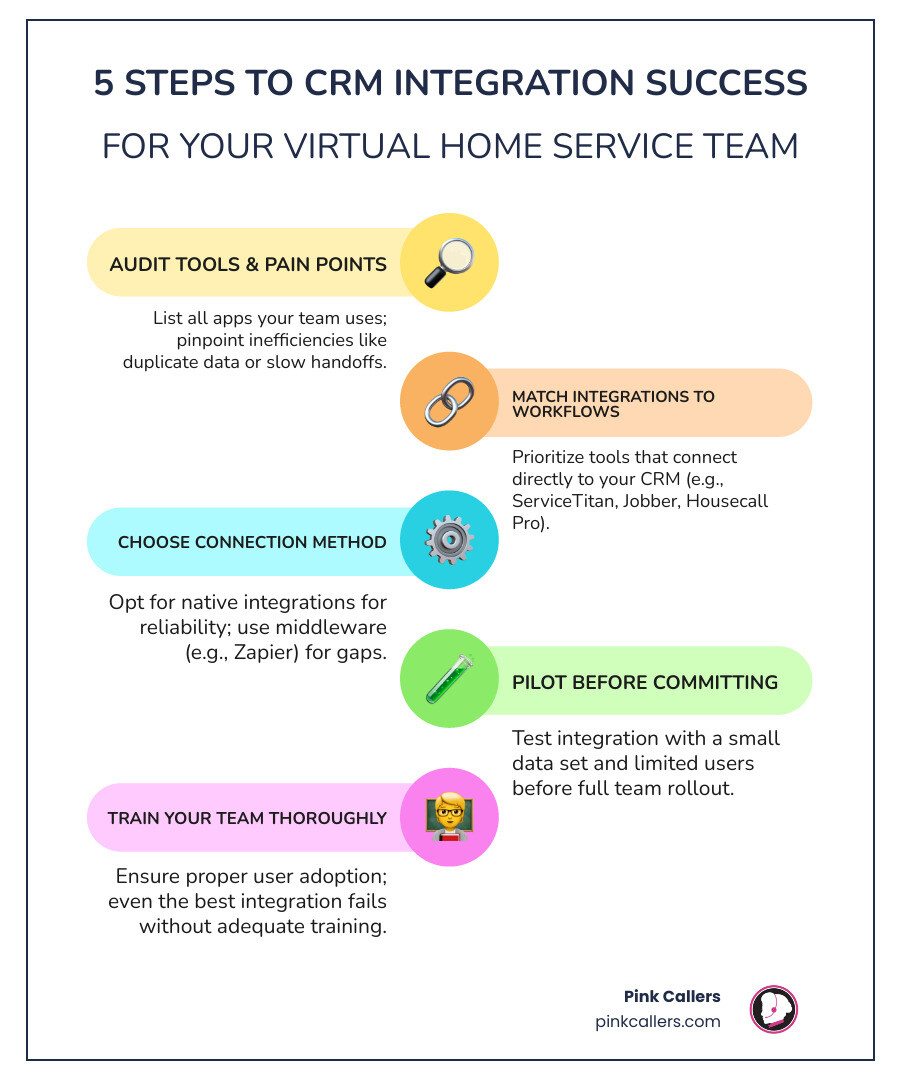
- Audit your current tools - List every app your team uses daily across scheduling, communication, and billing
- Identify your biggest pain points - Missed calls, duplicate data, manual entry, or slow handoffs
- Match integrations to workflows - Prioritize tools that connect directly to your CRM (like ServiceTitan, Jobber, or Housecall Pro)
- Choose the right connection method - Native integrations are most reliable; use middleware (like Zapier) for gaps
- Pilot before you commit - Test with a small data set before rolling out to your full team
- Train your team - Even the best integration fails without proper adoption
The average business runs on up to 30 cloud apps. For a virtual team spread across time zones, that number creates serious problems - data sitting in the wrong place, leads slipping through the cracks, and staff wasting hours on manual updates instead of serving customers.
For HVAC, plumbing, and electrical contractors, this is not just an IT headache. It directly affects how fast your team books jobs, how well they follow up on leads, and whether customers get a consistent experience every time they call.
In a survey of nearly 2,000 business professionals, customer service ranked as the top business priority for the next five years - ahead of product quality and pricing. Your CRM integrations are the backbone of how your virtual team delivers on that promise.
The good news: with the right setup, your CRM becomes a central hub that keeps your remote team connected, your customer data accurate, and your operations running smoothly - no matter where anyone is working from.
Why Choosing the Right CRM Integration for Your Virtual Team is Non-Negotiable in 2026
In the modern landscape of home services, your CRM is no longer just a digital rolodex; it is the central nervous system of your business. For virtual teams, the CRM acts as a centralized hub that bridges the physical gap between team members in San Diego, Nashville, or Jacksonville. Without proper connectivity, your remote workforce is essentially flying blind.
Choosing the right CRM integration for your virtual team ensures that data synchronization happens in real-time. When a customer calls to report a leaking water heater, your virtual receptionist should see that customer’s entire history instantly. This level of cloud accessibility allows for true business continuity. Whether your team is working from a home office or a satellite location, they need a "single source of truth" to prevent the dreaded data silos that stall growth.
Strategic integration transforms your CRM from a passive database into an active revenue engine. By following a CRM Management Services Complete Guide, you can see how connecting your phone systems, calendars, and marketing tools creates a seamless flow of information. This visibility is what allows a hybrid work model to actually succeed, keeping everyone on the same page without the need for constant "status update" meetings.
The Consequences of Operating Without Proper Connectivity
What happens when you ignore integration? In short: data chaos. For many contractors, the lack of integrated systems leads to a mountain of manual data entry. Your virtual assistant might take a message in one app, check a schedule in another, and then manually type that info into the CRM. This is a recipe for human error and employee burnout.
Fragmented communication creates customer friction. If a homeowner in Fort Worth calls and has to repeat their address and problem three times because the systems aren't talking to each other, their satisfaction plummets. Furthermore, businesses without these links often require extensive CRM Cleanup Services later to fix duplicate records and missing lead sources. Operating without connectivity is an expensive way to waste resources and lose the trust of your best customers.
Essential Types of CRM Integrations for Remote Home Service Operations
To build a high-performing virtual team, you must prioritize integrations that serve your specific business functions. For HVAC, plumbing, and electrical contractors, this usually falls into three buckets: marketing, operations, and finance.
- Marketing Automation & Lead Capture: Your CRM should talk to your website forms and local lead services. When a "Request Service" form is filled out, that data should flow directly into your system, triggering an immediate follow-up.
- Field Service Management (FSM): This is the "big one" for contractors. Using ServiceTitan for Home Service Businesses allows your virtual office team to dispatch technicians and update job statuses in real-time. Other excellent options include Jobber for Home Service Businesses and Housecall Pro for Home Service Businesses, which provide robust mobile and desktop connectivity.
- Financial Tracking: Integrating your CRM with accounting software ensures that when a job is marked "Complete" in the field, an invoice is generated and tracked automatically.
Native vs. Middleware Integrations
| Feature | Native Integration | Middleware (e.g., Zapier) |
|---|---|---|
| Setup Ease | High (Plug-and-play) | Moderate (Requires custom logic) |
| Reliability | High (Built by the software company) | Moderate (Dependent on third party) |
| Real-time Sync | Usually Instant | Can have slight latency |
| Cost | Often included or flat fee | Monthly subscription based on "tasks" |
Prioritizing Communication Tools when Choosing the Right CRM Integration for Your Virtual Team
Communication is the lifeblood of remote work. When choosing the right CRM integration for your virtual team, your phone system (VoIP) should be at the top of the list. An integrated VoIP system allows for "screen pops"—where the customer's profile appears on the screen the moment the phone rings. This gives your virtual CSRs the context they need to provide personalized service instantly.
Internal collaboration tools, such as Slack or Microsoft Teams, should also be linked. Imagine a scenario where a high-priority emergency lead comes in; an integrated system can automatically ping a specific channel so your team can react in seconds. Additionally, email and calendar sync are vital for Mastering Your CRM for Home Service Pros. Automated scheduling tools can allow customers to book their own appointments based on real-time availability, which helps you Get the Most from Your CRM 2.
A Step-by-Step Framework for Implementation and Data Centralization
Ready to hook everything up? Don't just start clicking "Install." You need a framework to ensure you don't break your existing workflows.
- The Tech Audit: List every digital tool you currently pay for. Are there overlaps? Do you really need three different ways to send text messages?
- Data Cleansing: Before you sync systems, make sure your data is clean. Integrating two messy databases just creates one giant, unusable mess. Consult a CRM Management Specialist Complete Guide for tips on standardizing addresses and phone numbers.
- Check API Maturity: Ensure the tools you are connecting have "mature" APIs, meaning they can handle high volumes of data without crashing.
- Pilot Testing: Never roll out a new integration to the whole company on a Monday morning. Test it with 20-30 records first to ensure the fields are mapping correctly.
- User Adoption: Provide role-specific training. A dispatcher needs to know different things about the integration than a marketing manager. This is a core part of CRM Management for Contractors.
Avoiding Common Pitfalls when Choosing the Right CRM Integration for Your Virtual Team
Even with a plan, there are traps to watch out for. One of the biggest is API latency, where data takes several minutes to move between systems. In the home service world, five minutes is the difference between winning a job and losing it to a faster competitor.
Another pitfall is ignoring security compliance. Ensure your integrations are SOC 2 or GDPR compliant, especially if you are handling customer credit card info or sensitive data. We often see businesses create overly complex workflows that nobody actually uses. Keep it simple. If you need professional help setting this up in a specific market, look for CRM Management Services Nashville or other local experts who understand the regional business climate. For a broader look at professional support, check out our CRM Management Services page.
Measuring the True ROI and Long-Term Impact on Customer Experience
Is all this effort worth it? The math says yes. To find the true ROI, look beyond the monthly licensing fees. Calculate the hours saved per employee by eliminating manual data entry. Most integrated teams recover several hours per week, per person.
Key metrics to track include:
- Handle Times: Integrated systems provide instant context, reducing the time spent searching for customer info.
- First-Call Resolution: Can your virtual team solve the customer's problem on the first call because they have all the data?
- Conversion Rates: Faster lead follow-up through automation directly leads to more booked jobs.
When you Maximize Business with CRM, you aren't just saving money; you are building a better brand. For CRM Home Service Businesses, the long-term impact is higher customer retention. A homeowner who experiences a smooth, professional booking process is far more likely to call you back for their next maintenance visit.
Frequently Asked Questions about CRM Integrations
What is the difference between a native integration and a connector app?
A native integration is built directly into the software (like a ServiceTitan-QuickBooks link). It’s usually more stable and easier to set up. A connector app like Zapier acts as a "translator" between two apps that don't have a direct link. While Zapier is incredibly flexible, it requires more ongoing management. For businesses in CRM Management Services San Diego, choosing between these often depends on the complexity of your specific tech stack.
How do integrations improve the customer experience for distributed teams?
Integrations provide real-time context. When a team is distributed across CRM Management Services Jacksonville, they can't just lean over a desk to ask a colleague about a customer. The integration ensures that the person answering the phone knows exactly what the person who sent the email promised. This creates a seamless, omnichannel experience for the homeowner.
How often should a virtual team audit their CRM integrations?
We recommend a full audit at least twice a year. Software updates can sometimes "break" custom links, and your business needs may change as you scale. Regular audits help identify system overlap and ensure you aren't paying for tools you no longer use. If you are operating in CRM Management Services Fort Worth, staying on top of your workflow optimization is key to maintaining a competitive edge in a busy market.
Conclusion
Choosing the right CRM integration for your virtual team is about more than just technology; it’s about strategic alignment and scalability. By centralizing your data and automating the "busy work," you empower your team to focus on what they do best: taking care of your customers.
At Pink Callers, we specialize in this exact intersection of technology and service. Our hybrid AI + human model is designed to integrate seamlessly with the tools you already use, like ServiceTitan or Jobber. We don't just answer phones; we become an extension of your team, ensuring that every lead is captured and every job is scheduled with precision. Whether you are looking to Optimize your workflow with Jobber integration or need 24/7 coverage to ensure you never miss a call, we are here to help your home service business thrive in a virtual world.
Keep reading
More from the blog
How We Handle Multi-Trade Dispatching for HVAC and Plumbing Combos
Misrouting an ambiguous 'no hot water' call wastes highly skilled technicians' time. We break down the exact intake triage rules that successfully separate plumbing from HVAC tickets.
Read → September 14, 2026Outsourced Customer Service vs Hiring a Local Temp Agency
Losing a dispatcher right before the fall heating rush can overwhelm any contractor. Compare the operational impact of a specialized call center versus a local temp worker to protect your revenue.
Read → September 11, 2026Transitioning Phone Scripts for Northeast Fall Boiler Prep
The first freeze brings a sudden wave of urgent no-heat calls that can easily overwhelm untrained CSRs. Prepare your dispatch board by strategically updating your front-office triage process.
Read →